

How to Build a Private AI Infrastructure Using Dedicated GPU Servers
AI workloads are becoming more demanding. Whether you are running large language models, training machine learning systems, processing computer vision data, or deploying AI applications for internal business use, traditional CPU-based infrastructure may eventually become a limitation.
For organizations handling sensitive data or requiring consistent AI performance, private AI infrastructure using dedicated GPU servers can provide greater control, security, and scalability.
Instead of sending workloads to shared public AI platforms, businesses can build an environment where their models, datasets, applications, and computing resources remain under their control.
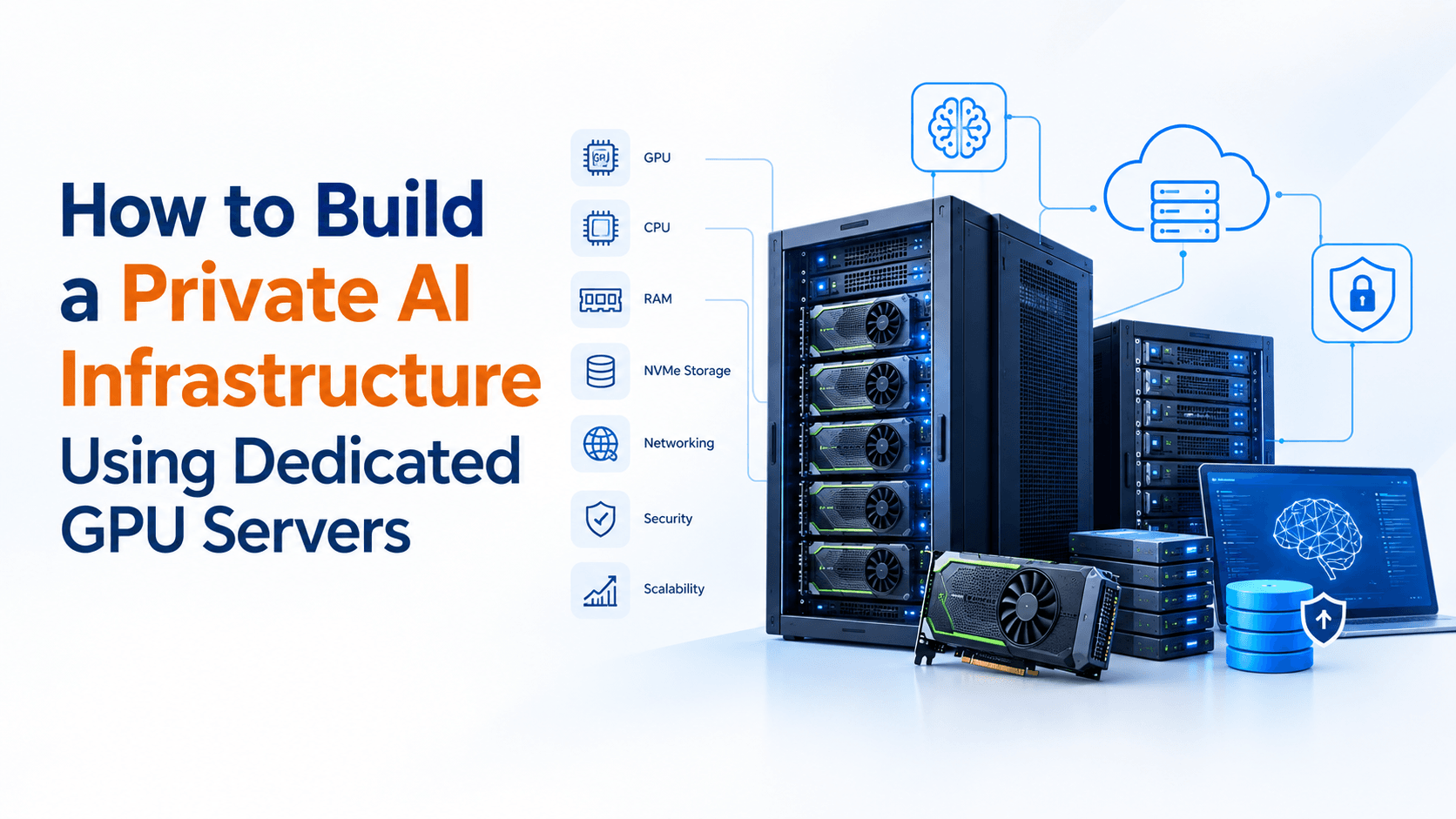
But building private AI infrastructure is more than simply purchasing a server with powerful GPUs. You need to consider GPU selection, CPU resources, RAM, storage, networking, virtualization, security, cooling, software, and future scalability.
Let’s look at how to approach it practically.
What Is Private AI Infrastructure?
Private AI infrastructure is a dedicated computing environment designed specifically to run AI and machine learning workloads within an organization-controlled infrastructure.
It can include:
- Dedicated GPU servers
- High-performance CPUs
- Large-capacity RAM
- NVMe SSD storage
- High-speed networking
- AI and machine learning software
- Containerized applications
- Model storage and databases
- Backup infrastructure
- Security and access controls
The infrastructure can be deployed in a company’s own data center or through a dedicated hosting/cloud infrastructure provider.
The main objective is to create an environment where businesses have greater control over AI workloads, data, computing resources, and performance.
Why Use Dedicated GPU Servers for Private AI?
GPUs are designed to perform large numbers of calculations simultaneously, making them particularly useful for AI workloads.
AI models often require thousands or millions of mathematical operations. GPUs can process many of these operations in parallel, significantly improving performance compared with relying only on conventional CPUs.
A dedicated GPU server can be useful for:
- AI model training
- Machine learning development
- Large language model inference
- Generative AI applications
- Computer vision
- Image and video processing
- Natural language processing
- Recommendation systems
- Data science workloads
- AI-powered business applications
The important point is that not every AI workload requires the most powerful GPU available. Infrastructure should be designed around the actual workload.
Step 1: Define Your AI Workload
Before selecting hardware, identify what you actually want to run.
Ask questions such as:
Are you training models or only running inference?
Training generally requires considerably more computing resources, while inference workloads can sometimes operate efficiently with smaller GPU configurations.
What size are your models?
A small machine learning model has very different hardware requirements from a large language model.
How much data will you process?
AI infrastructure needs sufficient storage for datasets, models, logs, checkpoints, and application data.
How many users will access the system?
A private AI environment supporting five developers has very different requirements from an AI application serving thousands of users.
Understanding these requirements first prevents unnecessary hardware spending.
Step 2: Choose the Right GPU
The GPU is one of the most important components of an AI server.
When comparing GPUs, don’t look only at the model name or raw performance. Consider:
- GPU memory
- Compute performance
- Memory bandwidth
- Power consumption
- Software compatibility
- Number of GPUs required
- Availability
- Total infrastructure cost
GPU memory is particularly important for AI workloads because models and data need to fit into available GPU memory.
For example, a workload involving a relatively small machine learning model may work comfortably with a smaller GPU, while large language models or complex training workloads may require multiple high-memory GPUs.
Step 3: Don’t Ignore the CPU and RAM
A GPU server still needs a capable CPU.
The CPU handles tasks such as:
- Data preparation
- Application processing
- Operating system operations
- Database activity
- Network processing
- Feeding data to the GPU
If the CPU cannot supply data quickly enough, the GPU may remain underutilized.
RAM is equally important. AI workloads can involve large datasets that need to be loaded, processed, cached, or transferred between storage and GPU memory.
A balanced configuration is therefore more useful than simply installing the most powerful GPU possible.
Step 4: Use Fast NVMe Storage
AI workloads can involve significant amounts of data.
Datasets, trained models, checkpoints, containers, logs, and temporary processing files can quickly consume storage.
Traditional hard drives may become a performance bottleneck for workloads that frequently read and write large files.
NVMe SSD storage provides much faster storage performance and lower latency, making it a strong choice for modern AI infrastructure.
You should also separate important storage requirements where practical, such as:
- Operating system storage
- AI datasets
- Model storage
- Application data
- Logs and temporary files
- Backup storage
This makes infrastructure management easier as the environment grows.
Step 5: Plan GPU Server Networking
Networking becomes increasingly important when multiple GPUs or servers are involved.
For example, a private AI environment might contain:
Users → Application Server → AI/GPU Server → Database/Storage
If large datasets need to move between systems, slow networking can reduce overall performance.
For multi-server AI infrastructure, high-speed networking may be required depending on the workload and architecture.
Network design should therefore be considered together with GPU, storage, and application requirements.
Step 6: Select the AI Software Stack
Hardware is only one part of private AI infrastructure.
The software environment needs to support your development and deployment requirements.
A typical environment may include:
- Linux
- NVIDIA drivers and CUDA
- Python
- PyTorch
- TensorFlow
- Docker
- Kubernetes
- Jupyter environments
- Model serving frameworks
- Monitoring tools
- Databases
- API services
Containerization can make AI environments easier to reproduce and manage.
For example, developers can package an AI application with its dependencies inside a container rather than manually configuring every server.
Step 7: Secure the Private AI Environment
One major reason businesses consider private AI infrastructure is greater control over sensitive information.
AI systems may process:
- Customer information
- Business documents
- Financial information
- Internal company data
- Proprietary datasets
- Intellectual property
Security should therefore be considered from the beginning.
Important controls include:
- Firewall configuration
- SSH key-based access
- Role-based permissions
- Network segmentation
- Regular operating system updates
- GPU server monitoring
- Encrypted data transmission
- Secure backups
- Access logging
- Strong authentication
Avoid exposing AI management interfaces directly to the public internet unless there is a clear security requirement and appropriate protection.
Step 8: Build Backup and Recovery Into the Design
A dedicated GPU server may be expensive infrastructure, but the data and models running on it can be even more valuable.
A hardware failure should not result in the loss of important datasets or trained models.
Consider maintaining separate backups for:
- AI datasets
- Model files
- Configuration files
- Application code
- Databases
- Important logs
Backup storage does not necessarily need to run on the same GPU server. Keeping backups separate provides additional protection if the primary infrastructure fails.
Step 9: Monitor GPU Utilization and Performance
Once your private AI infrastructure is running, monitoring becomes essential.
You should track:
- GPU utilization
- GPU memory usage
- CPU utilization
- RAM usage
- Storage capacity
- Disk performance
- Network traffic
- Server temperature
- Application performance
Monitoring helps identify whether your infrastructure is properly balanced.
For example, if GPU utilization remains low while CPU usage is consistently high, the bottleneck may not be the GPU at all.
Similarly, if GPUs frequently run out of memory, increasing system RAM alone will not solve the underlying problem.
Dedicated GPU Server vs Public Cloud AI Infrastructure
Both approaches have their place.
Public cloud platforms can be useful when you need rapid deployment, flexible resources, or temporary computing capacity.
Dedicated GPU infrastructure can make more sense when you require:
- Consistent GPU availability
- Greater control over infrastructure
- Predictable workloads
- Dedicated resources
- Data control
- Long-running AI workloads
- Customized server configurations
The right approach depends on workload duration, security requirements, budget, scalability, and operational capabilities.
A hybrid approach can also be considered, where core workloads run on dedicated infrastructure while additional capacity is obtained from cloud platforms when required.
How Much GPU Infrastructure Do You Actually Need?
There is no universal GPU server configuration for every business.
A practical starting point is to estimate:
Workload → Model size → GPU memory → Number of users → Storage → Network → Growth
For example, a company experimenting with internal AI applications may initially require a single GPU server.
An organization training large models or serving AI applications to many users may require multiple GPUs or multiple dedicated servers.
Starting with a properly sized configuration allows you to validate the workload before investing heavily in infrastructure.
Common Mistakes When Building Private AI Infrastructure
Businesses can run into problems when infrastructure is selected based only on GPU specifications.
Common mistakes include:
- Buying more GPU capacity than the workload requires
- Ignoring GPU memory requirements
- Using insufficient system RAM
- Creating storage bottlenecks
- Underestimating networking requirements
- Neglecting backups
- Exposing management services unnecessarily
- Failing to monitor resource utilization
- Choosing hardware without considering future expansion
The goal should not be to build the biggest AI server possible.
The goal should be to build an infrastructure environment that efficiently supports your AI workload today while allowing room for future growth.
Building a Scalable Private AI Infrastructure
A good private AI infrastructure should be designed with expansion in mind.
You may begin with one dedicated GPU server and later add:
- Additional GPUs
- More storage
- Additional GPU servers
- Dedicated database servers
- Backup servers
- High-speed networking
- Load balancing
- Container orchestration
This approach allows businesses to scale according to actual demand rather than paying for unused infrastructure from day one.
Build AI Infrastructure Around Your Workload
Private AI infrastructure can give organizations greater control over performance, security, data, and computing resources. But the success of the environment depends on more than choosing a powerful GPU.
CPU, RAM, GPU memory, NVMe storage, networking, software, security, monitoring, and backup all need to work together.
If your organization is planning AI workloads, dedicated GPU servers can provide a strong foundation for building a controlled and scalable AI environment.
At Site2Host, we help businesses evaluate hosting and infrastructure requirements based on their actual workloads rather than simply recommending the most expensive configuration. From dedicated infrastructure and VPS environments to cloud solutions and business hosting, the focus is on creating a practical setup that can support your applications as they grow.
Plan Your Private AI Infrastructure
Before investing in GPU infrastructure, evaluate your AI workload, model requirements, storage needs, expected users, security requirements, and future growth.
A properly planned infrastructure can help you get more value from your AI investment while avoiding unnecessary hardware and operational costs.
With proven results, industry expertise, and reliable support, we consistently deliver outcomes that competitors cannot match. If you want an infrastructure that grows with your ambitions and never lets your visitors down, get in touch with Site2Host today.
📞 +91-88988 16336 | +91-97681 14582
📧 sales@site2host.com
🌍 www.site2host.com
Facebook
Twitter
LinkedIn
Email
Latest Post
September 17, 2026
September 10, 2026

August 29, 2026
Related Article
September 25, 2026
No Comments
September 25, 2026
No Comments
September 17, 2026
No Comments