


What is Windows VPS Hosting? Features, Benefits & When to Use It
Virtual Private Server (VPS) hosting has become one of the most popular infrastructure choices for businesses that have outgrown shared hosting but are not yet ready to invest in a fully dedicated server. Within the VPS category, Windows VPS hosting occupies a specific and important niche.
While Linux VPS dominates in terms of volume and popularity, Windows VPS serves a distinct audience with distinct requirements. For organizations running Microsoft-based applications, .NET development environments, or software that specifically requires a Windows operating system, a Windows VPS is not just a preference but a technical necessity.
This guide explains what Windows VPS hosting is, what features matter most, why businesses choose it, and how to determine whether it is the right fit for your situation.
Understanding VPS Hosting First
Before diving into the Windows-specific aspects, it helps to understand what VPS hosting actually is.
A virtual private server is a virtualized instance that runs on a physical server shared with other VPS instances. Unlike shared hosting, where all websites share the same pool of resources, a VPS gives you dedicated allocations of CPU, RAM, and disk space. You have full root or administrator access to your virtual environment, which means you can install software, configure settings, and manage your server just as you would a dedicated machine.
The “private” aspect is what separates VPS from shared hosting. Your VPS is isolated from other users on the same physical server, which means their activity does not affect your performance and your data stays separate.
What Is Windows VPS Hosting?
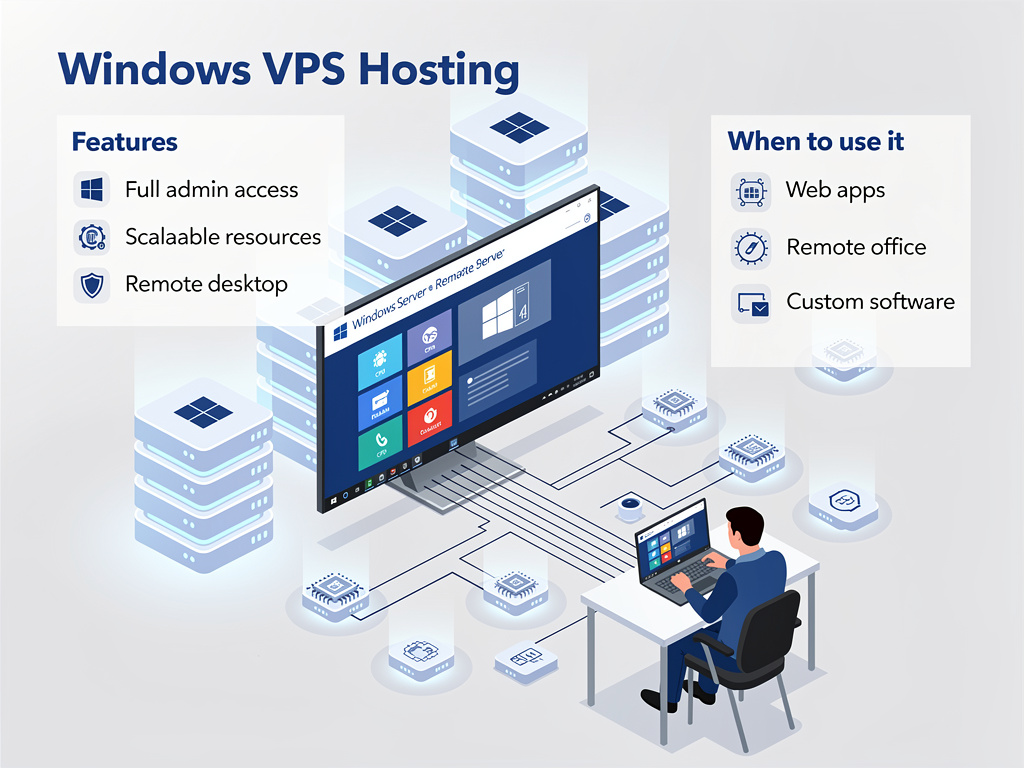
Windows VPS hosting is simply a VPS that runs the Microsoft Windows Server operating system. Instead of a Linux distribution, your virtual server is powered by a Windows environment, giving you full Windows administrator access, Remote Desktop Protocol (RDP) connectivity, and the ability to run Windows-native applications and services.
This makes Windows VPS the natural choice for any workload that depends on the Windows ecosystem, from ASP.NET web applications and Microsoft SQL Server databases to Windows-based desktop applications accessed remotely.
Key Features of Windows VPS Hosting
Remote Desktop Protocol Access
One of the defining features of Windows VPS hosting is RDP access. Through RDP, you can connect to your VPS from anywhere in the world and interact with it as though you were sitting in front of a physical Windows machine. You see the full Windows desktop, run applications, manage files, and administer the server through a graphical interface that most users find immediately familiar.
This is especially valuable for businesses that use software that only runs on Windows desktops, such as accounting software, proprietary business applications, or ERP systems that need to be accessed remotely by multiple team members.
Full Administrator Access
Windows VPS hosting provides you with full administrator privileges on your virtual server. You can install any software, modify system configurations, set up scheduled tasks, configure Windows Firewall, and manage users and permissions, all within a fully isolated environment that behaves exactly like a standalone Windows server.
NVMe or SSD Storage
Modern Windows VPS plans, including those at Site2Host, are powered by NVMe storage, which delivers significantly faster read and write speeds compared to traditional hard drives. This translates directly to faster application load times, snappier database queries, and a more responsive experience for users connecting via RDP.
Scalable Resources
Windows VPS hosting is built on virtualization technology that allows resources to be scaled as your needs grow. If your business expands and you need more RAM, additional CPU cores, or more disk space, upgrading your VPS plan is typically straightforward without migrating to a new server.
Dedicated IP Address
Each Windows VPS comes with its own dedicated IP address, which is important for running mail servers, SSL certificates, and applications that require a fixed network identity.
Isolated Environment
Because your VPS is isolated from other users, you benefit from consistent performance regardless of what other VPS instances on the same physical hardware are doing. This isolation also provides a security boundary that shared hosting cannot offer.
Benefits of Windows VPS Hosting
Familiarity for Windows Users
For IT teams and business users who work primarily within the Windows ecosystem, a Windows VPS eliminates the need to learn a new operating system. The graphical interface, file structures, and administrative tools are all the same as on any Windows workstation or server they have used before.
Native Support for Microsoft Technologies
Windows VPS natively supports the full Microsoft stack, including IIS (Internet Information Services) as a web server, ASP.NET and .NET Core for application development, Microsoft SQL Server as a database engine, and Active Directory services. Trying to replicate this environment on Linux, while technically possible in some cases, introduces unnecessary complexity and potential compatibility issues.
Remote Access for Distributed Teams
Many businesses use Windows VPS as a centralized remote working environment. Team members in different locations can connect via RDP and run software as though they are all working from the same machine. This makes Windows VPS an effective and affordable alternative to complex virtual desktop infrastructure setups.
Run Windows-Only Software on the Cloud
Some business-critical software simply does not have a Linux or web-based equivalent. Whether it is a legacy ERP system, an industry-specific tool, or a desktop application that needs to be accessible from multiple locations, Windows VPS lets you run that software in a stable, always-on cloud environment.
Tally on Cloud
In the Indian business context specifically, Tally is widely used for accounting and financial management. Running Tally on a Windows VPS allows multiple users to access it simultaneously from any location, which is a significant operational advantage for growing businesses with remote teams or multiple office locations.
When to Use Windows VPS Hosting
Windows VPS hosting makes the most sense in the following scenarios.
You are running .NET or ASP.NET applications that require IIS and the Windows runtime environment. You need Microsoft SQL Server as your database and want it running in a native Windows environment. Your team uses Windows-based desktop applications that need to be accessed remotely by multiple users. You are hosting a Tally or other Windows-only business application in the cloud. You prefer a graphical, RDP-based administration experience over command-line management. Your organization is heavily invested in the Microsoft ecosystem and needs seamless integration with Active Directory or other Windows services.
If none of these scenarios apply to your use case and your workload is primarily web hosting or open-source application hosting, a Linux VPS will generally be more cost-effective and performant.
Windows VPS vs Linux VPS: A Quick Comparison
Feature | Windows VPS | Linux VPS |
OS Cost | Licensing fee included | Free (open source) |
Access Method | RDP (graphical) | SSH (command line) |
Best For | .NET, MSSQL, Tally, Windows apps | PHP, Python, Node.js, web hosting |
Ease of Use | Familiar for Windows users | Better for developers and sysadmins |
Performance | Strong, higher resource needs | Excellent, lower overhead |
Microsoft Stack | Full native support | Limited compatibility |
What to Look for When Choosing a Windows VPS Provider
Not all Windows VPS plans are created equal. When evaluating providers, look for NVMe storage for faster performance, generous RAM allocations since Windows uses more memory than Linux, a clean and stable network with low latency, around-the-clock support from a team that understands Windows environments, and transparent pricing that includes the Windows Server license without hidden fees.
At Site2Host, our Windows VPS plans include NVMe storage, full RDP access, dedicated IP addresses, and round-the-clock expert support. Our infrastructure is optimized for both performance and reliability, making it a strong foundation for business-critical Windows workloads.
Your Next Step Forward
Windows VPS hosting solves a specific and important problem: running Windows-dependent applications in a scalable, always-on cloud environment without the cost of a dedicated server. Whether you need it for .NET development, remote Tally access, or housing your business software, Windows VPS gives you the control and performance your applications deserve.
With proven results, industry expertise, and reliable support, we consistently deliver outcomes that competitors cannot match. If you want an infrastructure that grows with your ambitions and never lets your visitors down, get in touch with Site2Host today.
📞 +91-88988 16336 | +91-97681 14582
📧 sales@site2host.com
🌍 www.site2host.com
Facebook
Twitter
LinkedIn
Email
Latest Post

September 17, 2026

September 10, 2026

August 29, 2026

Related Article
September 25, 2026
No Comments
September 25, 2026
No Comments
September 17, 2026
No Comments