


Linux Server vs Windows Server: Key Differences 2026
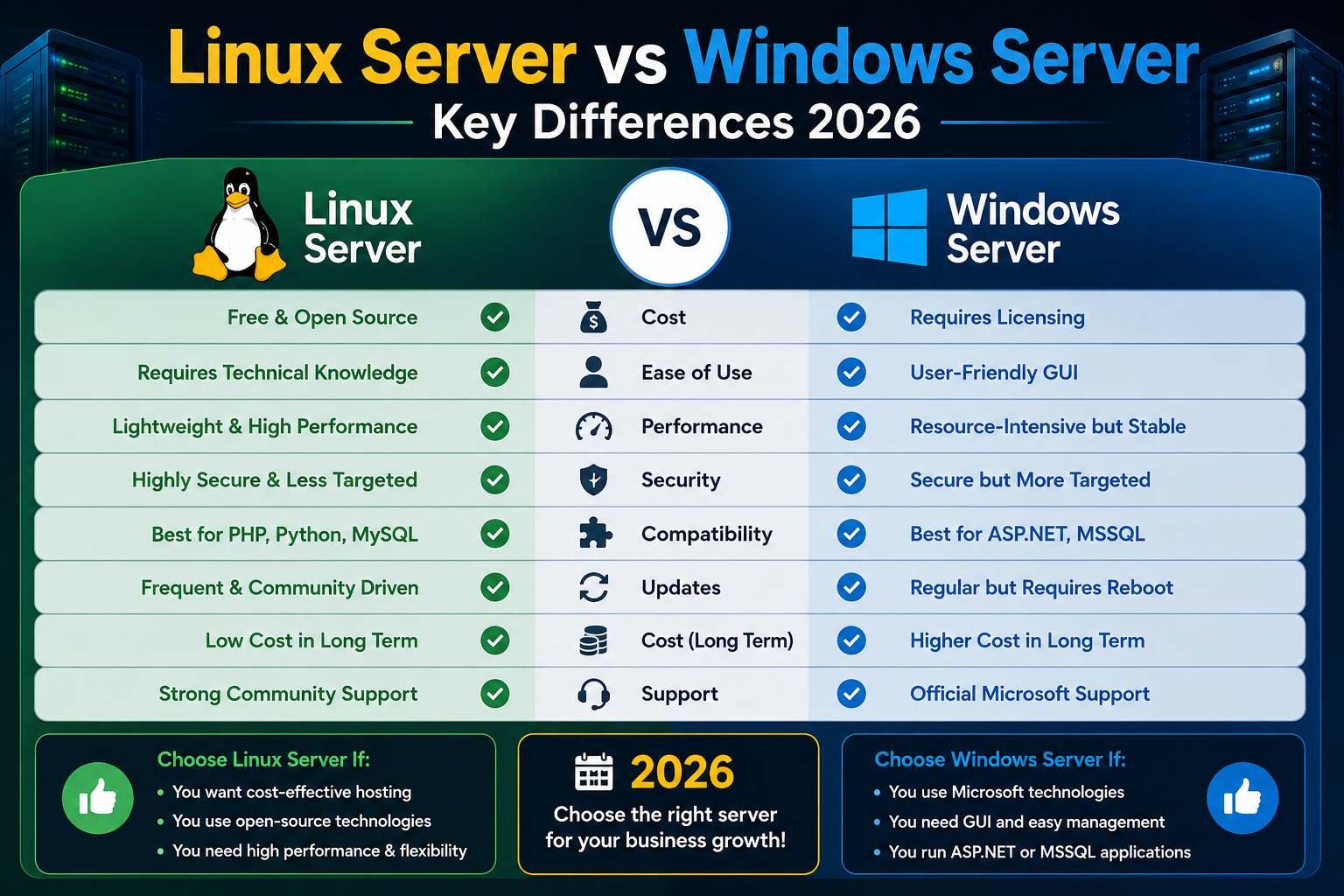
Choosing a server operating system is one of the most important infrastructure decisions you will make for your business. Get it right, and your applications run smoothly, your team works efficiently, and your costs stay under control. Get it wrong, and you spend months dealing with compatibility headaches, security gaps, and unexpected expenses.
The debate between Linux servers and Windows servers has been going on for decades, and in 2026, both platforms have matured significantly. Each has a loyal user base and solid reasons to be chosen. But they are not interchangeable, and the best choice depends entirely on what you are building, who manages it, and what your long-term goals are.
This guide will cut through the noise and give you a clear, honest comparison so you can make the right call.
What Is a Linux Server?
Linux Server is an open-source operating system built on the Linux kernel. It powers a massive portion of the internet, from small personal projects to enterprise-scale applications at companies like Google, Amazon, and Meta.
Because Linux is open source, there is no licensing fee for most distributions. Popular server distributions include Ubuntu Server, CentOS, Debian, AlmaLinux, and Rocky Linux. Each is maintained by a community or an organization, and each has slightly different strengths.
Linux servers are managed primarily through a command-line interface, though graphical management panels like cPanel are widely available for web hosting environments. The ecosystem is rich, the community support is extensive, and the performance on standard hardware tends to be strong.
What Is Windows Server?
Windows Server is a proprietary operating system developed by Microsoft. It is designed to integrate tightly with other Microsoft products, including Active Directory, Microsoft SQL Server, Exchange Server, SharePoint, and the Microsoft 365 suite.
Unlike Linux, Windows Server requires a paid license, and the cost can be significant depending on the version and the number of users or cores. However, for organizations already invested in the Microsoft ecosystem, Windows Server often reduces complexity because everything speaks the same language.
Windows Server offers a familiar graphical interface, which lowers the barrier to entry for teams that are not comfortable with command-line management.
Linux Server vs Windows Server: Head-to-Head Comparison
Cost
Linux Server wins here by a clear margin. Most Linux distributions are free to use, meaning your primary costs are hardware, infrastructure, and support if needed. Windows Server, on the other hand, requires purchasing a license from Microsoft. Depending on the edition and the number of virtual machines or cores you need to cover, licensing costs can run into thousands of dollars annually.
For startups and small businesses watching their budget, this alone can be a decisive factor.
Performance
Linux is known for efficient resource utilization. It can run effectively on older or lower-specification hardware and handles high-traffic workloads with less overhead. This is a major reason why web servers, database servers, and cloud infrastructure overwhelmingly run on Linux.
Windows Server performs well in environments where Microsoft applications are central, but it generally requires more RAM and processing power for the same workload compared to a lean Linux setup.
Security
Both operating systems take security seriously, but they approach it differently. Linux benefits from its open-source nature, where vulnerabilities are identified and patched quickly by a global community. It also has a smaller attack surface in terms of targeted malware, partly because of how permissions and user privileges work at the system level.
Windows Server is a more common target for cyberattacks given its widespread use in corporate environments. Microsoft has invested heavily in security features over the years, including Windows Defender, BitLocker, and robust Group Policy controls, but it still requires diligent patching and management.
Ease of Use
Windows Server is more approachable for teams already familiar with the Windows environment. The graphical interface makes common administrative tasks accessible without deep technical knowledge.
Linux has a steeper learning curve for those unfamiliar with command-line interfaces, but the trade-off is greater control and flexibility. Once your team is comfortable, Linux administration is fast and efficient.
Application and Software Compatibility
This is where Windows Server has a significant advantage for certain organizations. If your business relies on Microsoft-specific software, such as ASP.NET applications, SQL Server, SharePoint, or Microsoft Exchange, Windows Server is the natural environment.
Linux excels with open-source stacks. LAMP (Linux, Apache, MySQL, PHP) and LEMP (Linux, Nginx, MySQL, PHP) configurations power the majority of websites and web applications globally. If your stack is PHP, Python, Node.js, Ruby, or Java-based, Linux is an excellent and well-supported choice.
Stability and Uptime
Linux servers are famous for their uptime. Many Linux systems run continuously for years without needing a restart. Updates can often be applied without rebooting, which is a significant advantage in environments where downtime is costly.
Windows Server typically requires restarts after major updates and patches, which demands planned maintenance windows.
Support
Windows Server comes with Microsoft’s official support ecosystem, which is a comfort factor for enterprises with support contracts in place.
Linux support depends on the distribution and whether you are using a community version or a commercially supported one such as Red Hat Enterprise Linux or Ubuntu Pro. For web hosting environments, most hosting providers offer strong support for Linux-based servers.
When to Choose Linux Server
Linux is the right choice when you are running web applications, databases, or cloud workloads on open-source technology stacks. It is also ideal when cost efficiency matters, when you have a technically capable team comfortable with command-line management, or when you need maximum control over your server environment.
If you are hosting WordPress, Magento, Laravel, Django, or similar platforms, Linux is almost always the better-performing and more cost-effective option.
When to Choose Windows Server
Windows Server makes sense when your business depends on Microsoft-native applications. If you run .NET applications, use Microsoft SQL Server as your database, or need seamless integration with Active Directory and Microsoft 365, Windows Server will save you integration headaches and is the more practical choice.
It is also worth considering Windows Server if your IT team has deep Windows expertise and limited Linux experience, as the total cost of retraining and managing an unfamiliar platform can outweigh the licensing savings.
A Quick Reference: Linux vs Windows Server at a Glance
Feature | Linux Server | Windows Server |
Cost | Free (most distros) | Paid license required |
Performance | High and low overhead | Good, higher resource use |
Security | Strong, smaller attack surface | Robust but more targeted |
Ease of Use | Command-line focused | GUI-friendly |
Best For | Web hosting, open-source apps | Microsoft ecosystem, .NET apps |
Uptime | Excellent, minimal restarts | Good, requires planned downtime |
How Site2Host Helps You Get This Right
Picking the right server OS is only half the equation. The other half is choosing a hosting partner that understands your needs, configures your environment correctly, and supports you when things get complex.
At Site2Host, we offer both Linux VPS and Windows VPS hosting with NVMe-powered storage, full root access, dedicated IP addresses, and scalable plans built for real business demands. Whether you are starting fresh with a new application or migrating an existing server setup, our team has the experience to guide you through every step.
Your Next Step Forward
The choice between Linux Server and Windows Server ultimately comes down to your software environment, your team’s expertise, and your budget. Linux delivers outstanding performance and cost efficiency for web-focused workloads. Windows Server provides seamless compatibility for Microsoft-dependent applications.
Both are powerful. Neither is universally better. The right one is the one that fits your actual needs.
With proven results across hundreds of businesses, industry expertise in both Linux and Windows environments, and round-the-clock technical support, Site2Host consistently delivers outcomes that competitors can’t match. If you want reliable, fast, and expertly managed server hosting, reach out to us today and let’s find the right solution together.
With proven results, industry expertise, and reliable support, we consistently deliver outcomes that competitors cannot match. If you want an infrastructure that grows with your ambitions and never lets your visitors down, get in touch with Site2Host today.
📞 +91-88988 16336 | +91-97681 14582
📧 [email protected]🌍 www.site2host.com
Facebook
Twitter
LinkedIn
Email
Latest Post


September 17, 2026

September 10, 2026

August 29, 2026

Related Article
September 25, 2026
No Comments
September 25, 2026
No Comments
September 17, 2026
No Comments